



Big New Updates for Overstreet Access!
A better home base for collectors
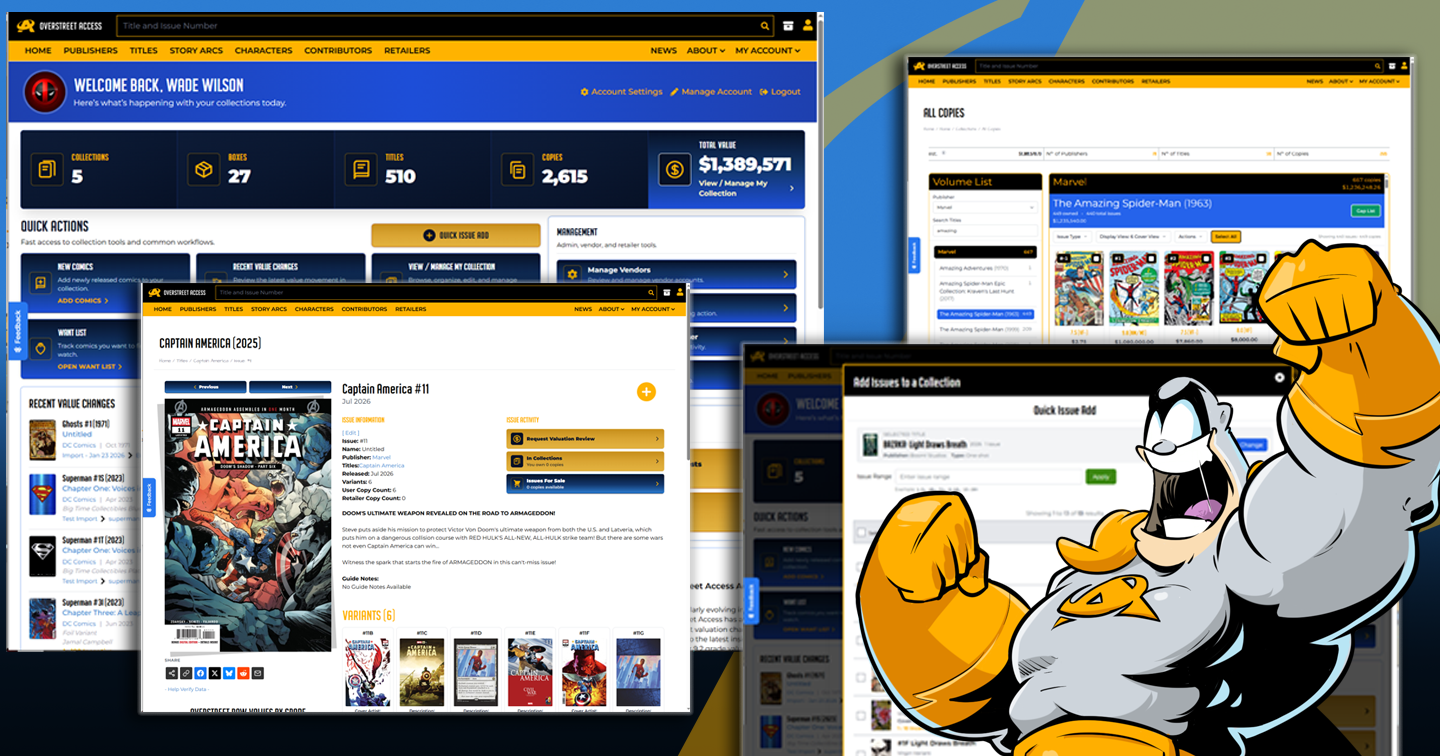
We have been making a lot of improvements across Overstreet Access, and the goal behind all of them is pretty simple: help you get to the comics, values, tools, and collection details you care about with less digging.
Some of these updates are big and easy to see, like the redesigned dashboard and the new beta collection management experience. Others are quieter, like cleaner catalog links, better issue relationships, and more reliable character counts. Together, they make Overstreet Access feel more useful as both a collection manager and a comic research tool.
This article gives you the quick tour. Each section below can link to a deeper guide if you want the full walkthrough.
The new dashboard gives you a faster starting point
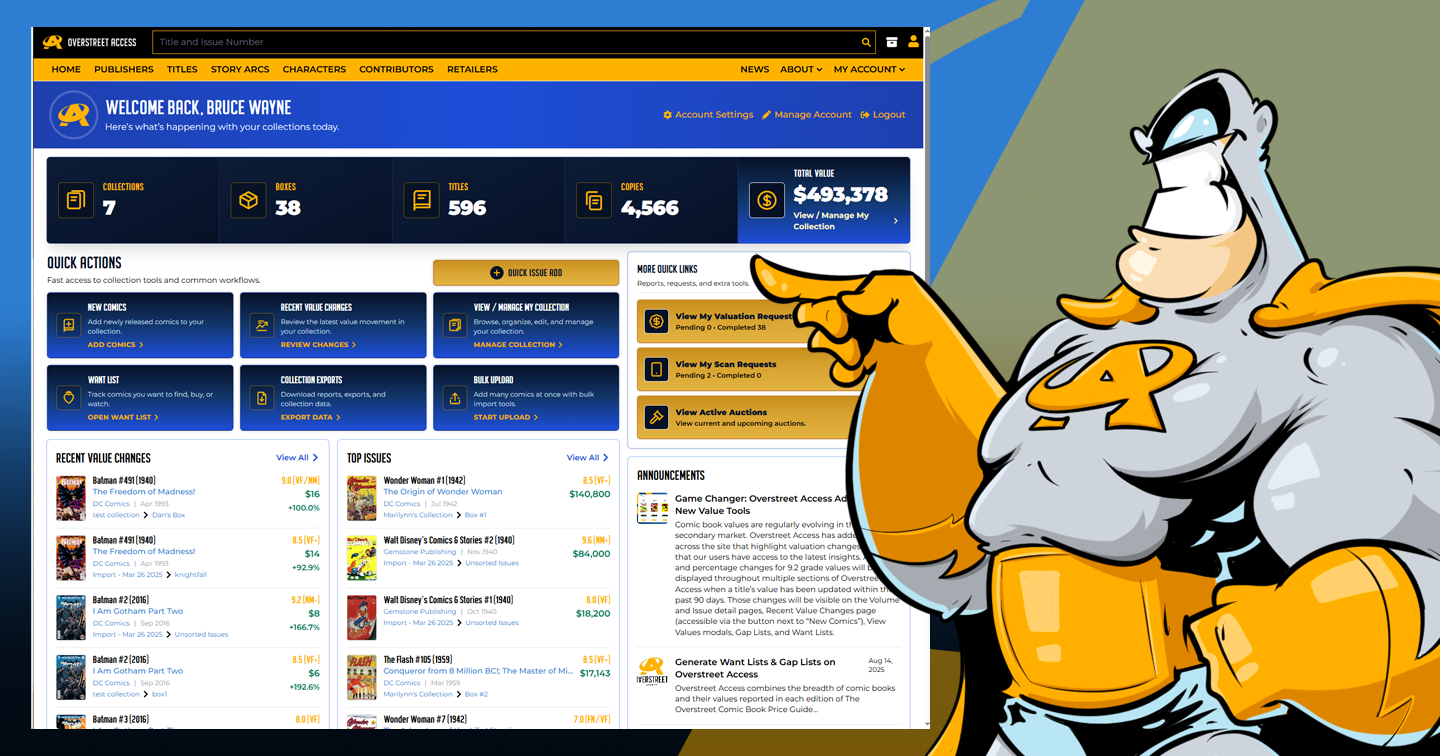
When you sign in, the new dashboard is designed to give you a quick read on your collection and a faster path into common tools. You can see a snapshot of your collection, jump into collection workflows, check recent value movement, review top issues, and keep up with Overstreet Access announcements from one place.
Quick Issue Add helps you add books faster
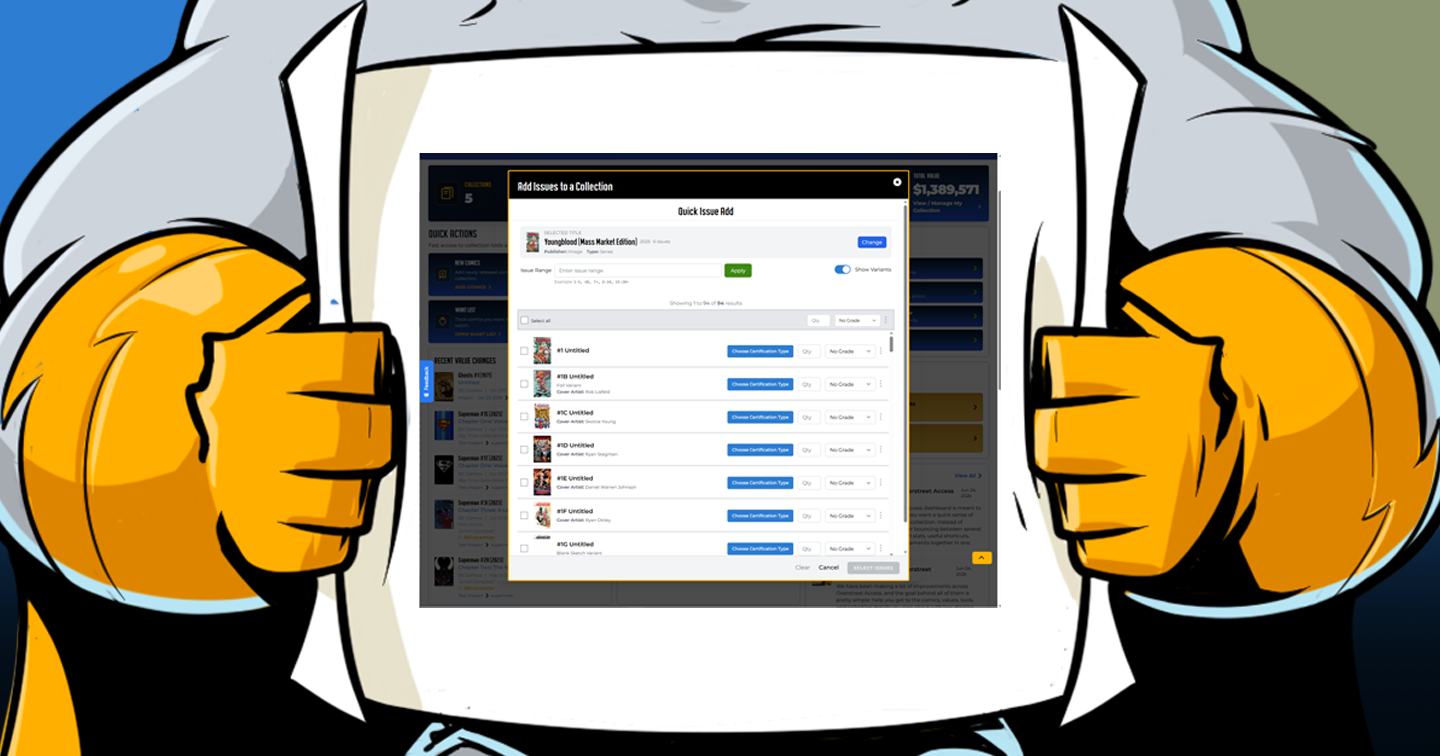
Quick Issue Add is one of the most useful new dashboard tools. It opens a guided workflow where you search for a title, choose the issues you want, set grades and optional copy details, pick the collection and box, and add the books to your collection.
The biggest new piece is Issue Range. Instead of scrolling through a long title issue by issue, you can type a range like 1-10, 7+, or 1-5, 6B, 10+ to quickly narrow the list. The range filters what you see, then you still review and select the issues before adding them.
Issue detail pages are becoming better research hubs
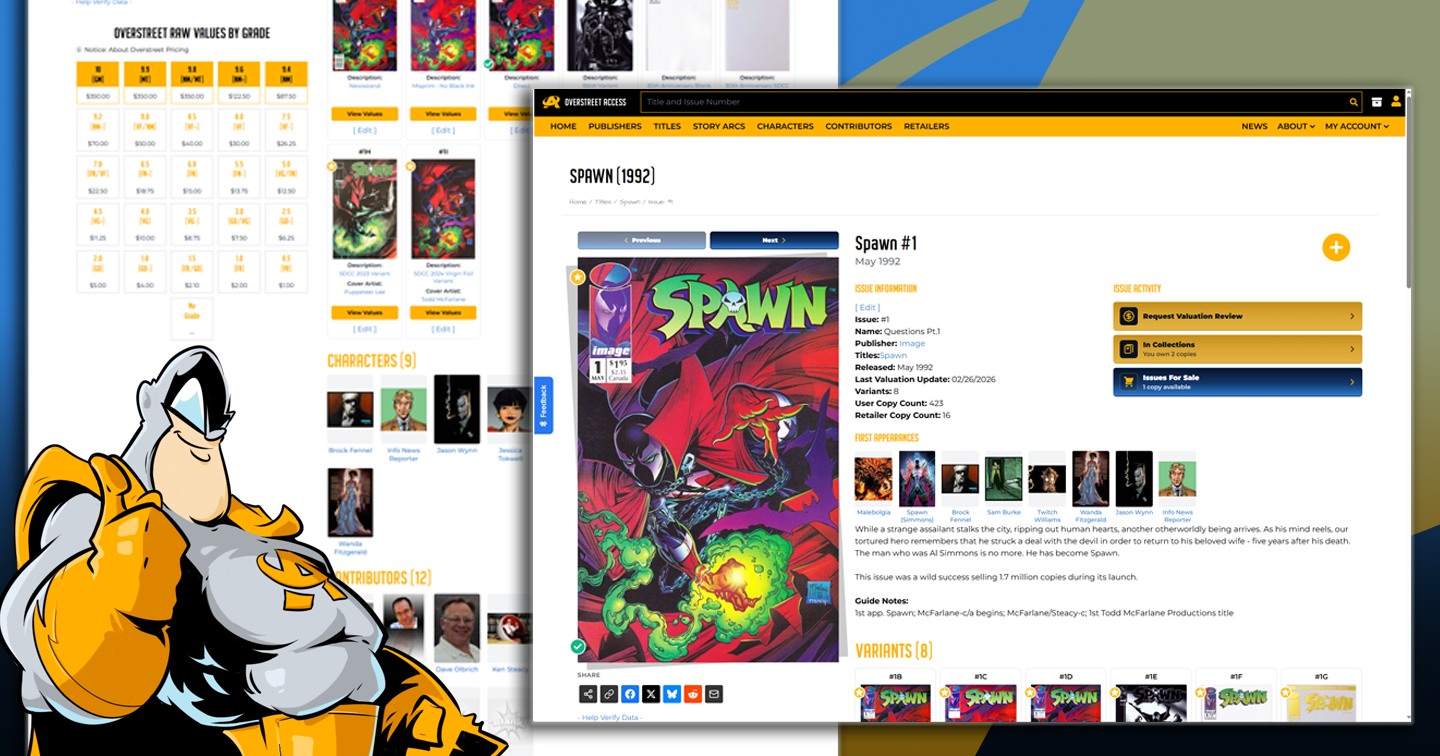
Issue pages now surface more of the context collectors care about. Important relationships and supporting details are easier to find, so the page feels less like a single isolated record and more like a connected reference page.
The beta collection manager gives larger collections more breathing room
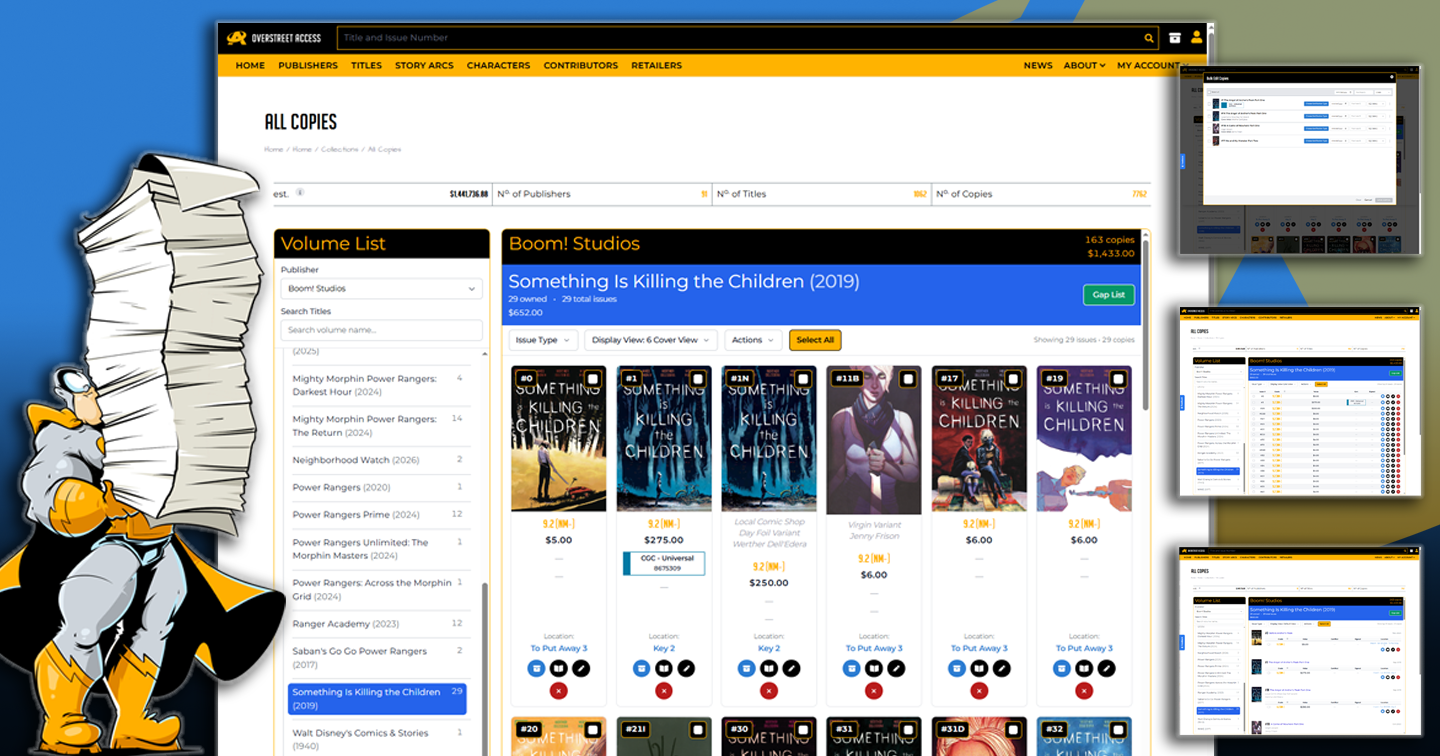
The new beta collection management experience is built around a volume-first workflow. Instead of expanding one section after another, you choose a volume from a searchable list and immediately see the owned issues and copies for that series.
This is especially helpful when your collection has grown across many boxes, variants, grades, certified copies, and duplicate copies. The beta view brings more of that work into one organized workspace.
Bulk tools make collection cleanup easier
For collectors managing a lot of books, the new bulk workflows can save a lot of repetitive clicking. You can select multiple copies and use bulk actions to move them, edit shared details, or delete copies you no longer need in the system.
Bulk tools are powerful, so they are worth learning carefully. The most important habit is to review your selected copies before confirming a move, edit, or delete.
Additional System Enhancements
Cleaner catalog links and better navigation
We have also been improving the way catalog records link to each other. More links across Overstreet Access are becoming cleaner, more descriptive, and easier to recognize. That helps when you bookmark pages, share links, or move between issues, volumes, publishers, characters, contributors, and story arcs.
You may also see cleaner links in some Overstreet Access emails that point back to issue pages.
Better character counts and catalog quality
Some catalog improvements are less flashy but still important. Character issue counts are being aligned more closely with active, viewable comic content. That means counts should better reflect meaningful live catalog data instead of older or inactive relationships.
This is part of a broader effort to make catalog browsing feel cleaner, more connected, and more trustworthy over time.

Popular Topics
Overstreet Access Quick Links
Big New Updates for Overstreet Access!
A better home base for collectors
We have been making a lot of improvements across Overstreet Access, and the goal behind all of them is pretty simple: help you get to the comics, values, tools, and collection details you care about with less digging.
Some of these updates are big and easy to see, like the redesigned dashboard and the new beta collection management experience. Others are quieter, like cleaner catalog links, better issue relationships, and more reliable character counts. Together, they make Overstreet Access feel more useful as both a collection manager and a comic research tool.
This article gives you the quick tour. Each section below can link to a deeper guide if you want the full walkthrough.
The new dashboard gives you a faster starting point
When you sign in, the new dashboard is designed to give you a quick read on your collection and a faster path into common tools. You can see a snapshot of your collection, jump into collection workflows, check recent value movement, review top issues, and keep up with Overstreet Access announcements from one place.
Quick Issue Add helps you add books faster
Quick Issue Add is one of the most useful new dashboard tools. It opens a guided workflow where you search for a title, choose the issues you want, set grades and optional copy details, pick the collection and box, and add the books to your collection.
The biggest new piece is Issue Range. Instead of scrolling through a long title issue by issue, you can type a range like 1-10, 7+, or 1-5, 6B, 10+ to quickly narrow the list. The range filters what you see, then you still review and select the issues before adding them.
Issue detail pages are becoming better research hubs
Issue pages now surface more of the context collectors care about. Important relationships and supporting details are easier to find, so the page feels less like a single isolated record and more like a connected reference page.
The beta collection manager gives larger collections more breathing room
The new beta collection management experience is built around a volume-first workflow. Instead of expanding one section after another, you choose a volume from a searchable list and immediately see the owned issues and copies for that series.
This is especially helpful when your collection has grown across many boxes, variants, grades, certified copies, and duplicate copies. The beta view brings more of that work into one organized workspace.
Bulk tools make collection cleanup easier
For collectors managing a lot of books, the new bulk workflows can save a lot of repetitive clicking. You can select multiple copies and use bulk actions to move them, edit shared details, or delete copies you no longer need in the system.
Bulk tools are powerful, so they are worth learning carefully. The most important habit is to review your selected copies before confirming a move, edit, or delete.
Additional System Enhancements
Cleaner catalog links and better navigation
We have also been improving the way catalog records link to each other. More links across Overstreet Access are becoming cleaner, more descriptive, and easier to recognize. That helps when you bookmark pages, share links, or move between issues, volumes, publishers, characters, contributors, and story arcs.
You may also see cleaner links in some Overstreet Access emails that point back to issue pages.
Better character counts and catalog quality
Some catalog improvements are less flashy but still important. Character issue counts are being aligned more closely with active, viewable comic content. That means counts should better reflect meaningful live catalog data instead of older or inactive relationships.
This is part of a broader effort to make catalog browsing feel cleaner, more connected, and more trustworthy over time.
Popular Topics
Overstreet Access Quick Links