



Search for Comics with Ease on Overstreet Access
Searching for comic book values and building a list of books to collect can be overwhelming. There are hundreds of thousands of comics, big name characters star in many titles, there are interconnected series, and other facets that can make the process seem like a tall task. Fortunately, OverstreetAccess.com simplifies the process with a variety of search tools.
To search for comics to add to a collection, simply use the options at the top of the screen. Collectors can search by publishers, titles, story arcs, characters, contributors, and retailers.
The publisher search lists the publishers in alphabetical order, and the search bar can be used to go directly to a publisher and their affiliates. For instance, a search of Skybound will also produce results for Image Comics because Skybound is an imprint of Image. You can also click on the “A-Z” icon to go directly to a specific letter in the alphabet.
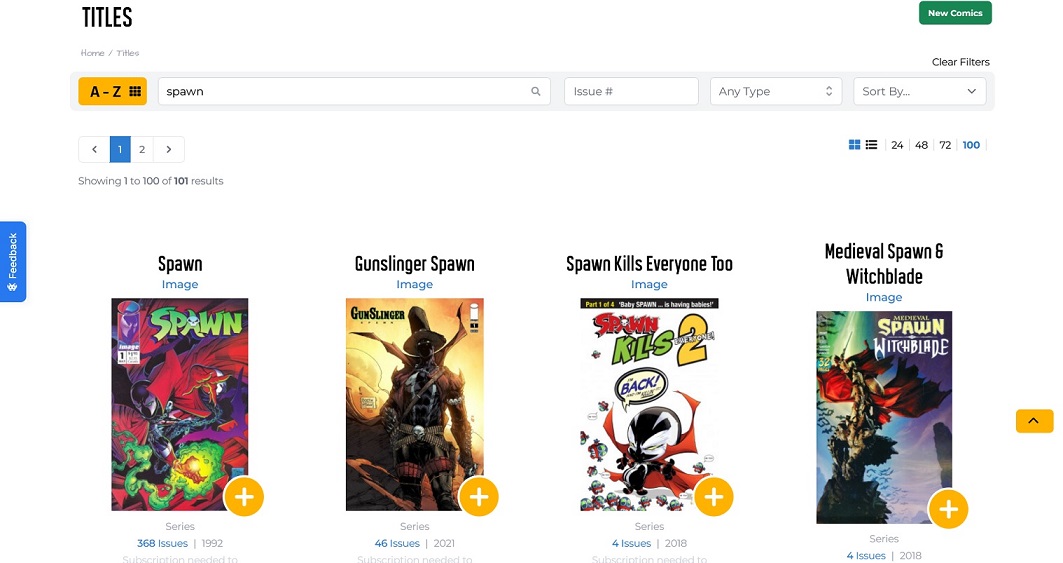
Typing the name of a book in the title search will generate a list of all related titles. For example, searching for “Spawn” brings up Spawn, Gunslinger Spawn, Medieval Spawn & Witchblade, and several more. Specific issues of the book can be found by typing the issue number, there’s an option to search by format (series, trade paperback, one-shot, etc.), and the list can be sorted by alphabetical order or publication date.
The story arcs tab generates a list of storylines connected to the search parameters. For example, searching for “Knightfall” brings up that story arc, “Knightquest: The Crusade,” “Angel and the Bane,” and more.
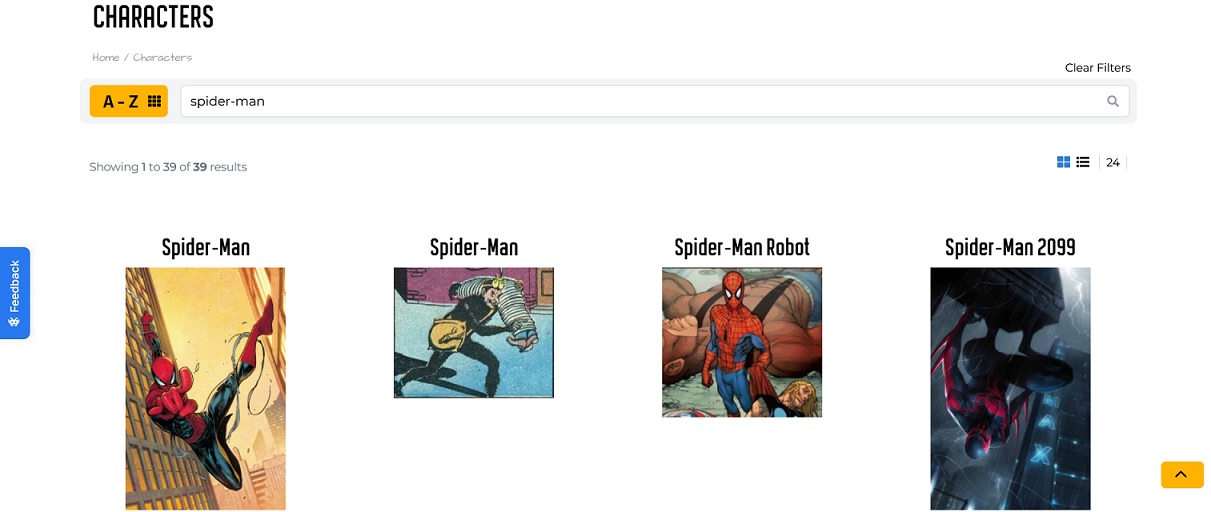
Under the characters search, collectors will find all of the issues in which a particular character appears. It generates a list of all the characters that share that name, so a search of Spider-Man includes Spider-Man 2099, Spider-Man Robot, and others.
The contributors tab produces a list of all the books a particular creator has worked on. It also includes biographical information on the creators.
Finally, the retailers section allows collectors to find comic shops close to them that may have the books they want to add to their collection. Collectors can search by shop name, city, state, or zip code, and collectors can add retailers to their “favorites” list for easier reference later.

Popular Topics
Overstreet Access Quick Links
Search for Comics with Ease on Overstreet Access
Searching for comic book values and building a list of books to collect can be overwhelming. There are hundreds of thousands of comics, big name characters star in many titles, there are interconnected series, and other facets that can make the process seem like a tall task. Fortunately, OverstreetAccess.com simplifies the process with a variety of search tools.
To search for comics to add to a collection, simply use the options at the top of the screen. Collectors can search by publishers, titles, story arcs, characters, contributors, and retailers.
The publisher search lists the publishers in alphabetical order, and the search bar can be used to go directly to a publisher and their affiliates. For instance, a search of Skybound will also produce results for Image Comics because Skybound is an imprint of Image. You can also click on the “A-Z” icon to go directly to a specific letter in the alphabet.
Typing the name of a book in the title search will generate a list of all related titles. For example, searching for “Spawn” brings up Spawn, Gunslinger Spawn, Medieval Spawn & Witchblade, and several more. Specific issues of the book can be found by typing the issue number, there’s an option to search by format (series, trade paperback, one-shot, etc.), and the list can be sorted by alphabetical order or publication date.
The story arcs tab generates a list of storylines connected to the search parameters. For example, searching for “Knightfall” brings up that story arc, “Knightquest: The Crusade,” “Angel and the Bane,” and more.
Under the characters search, collectors will find all of the issues in which a particular character appears. It generates a list of all the characters that share that name, so a search of Spider-Man includes Spider-Man 2099, Spider-Man Robot, and others.
The contributors tab produces a list of all the books a particular creator has worked on. It also includes biographical information on the creators.
Finally, the retailers section allows collectors to find comic shops close to them that may have the books they want to add to their collection. Collectors can search by shop name, city, state, or zip code, and collectors can add retailers to their “favorites” list for easier reference later.
Popular Topics
Overstreet Access Quick Links