



Overstreet Access Introduces New Dashboard
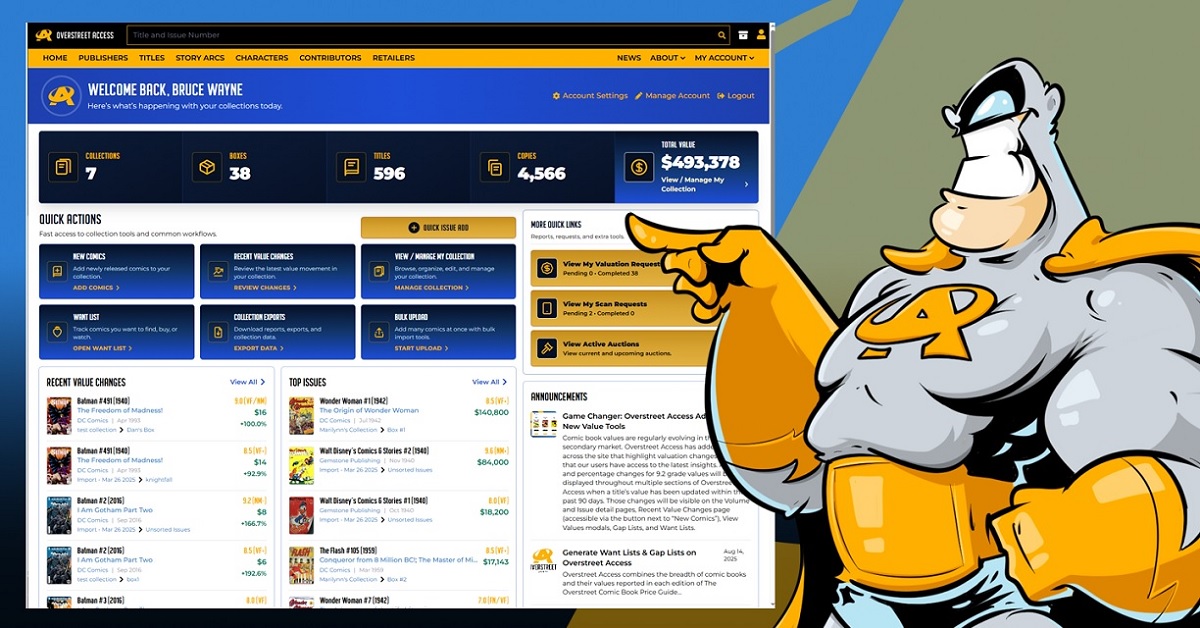
The Overstreet Access dashboard has been redesigned to provide users with a clear look at their collection. Instead of starting with a blank menu or going between multiple pages, users can see collection stats, find helpful shortcuts, see value previews, and get announcements in one view. This new homebase brings the deeper tools of Overstreet Access to the surface for more convenient access.
Collection Snapshot
When users sign in to Overstreet Access, they are taken directly to the dashboard where the collection snapshot provides a quick overview of the collection. Depending on the subscription level, the snapshot shows collections, boxes, volumes or titles, copies, and total value. This provides answers to basic questions like the size of the collection, how it is organized, and what is it currently worth.
Quick Actions Tools
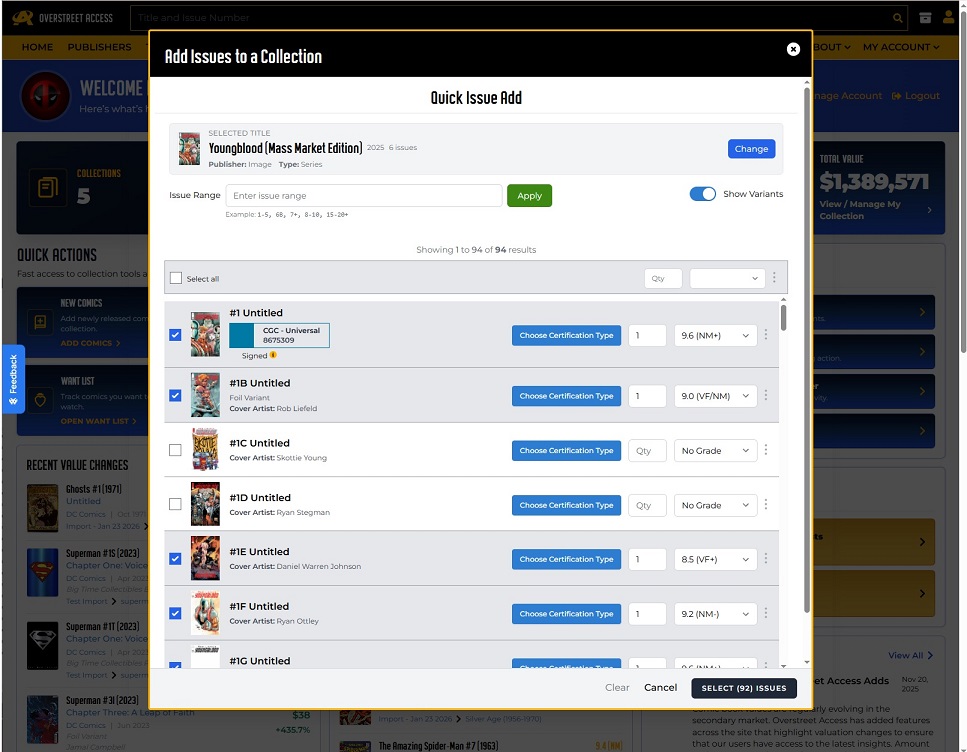
The Quick Actions section was designed to cut time spent hunting through menus. The Quick Issue Add opens a modal where users can search for a title, choose issues, add grades, list other details, and add them to a collection or box. New Comics generates a list of the newly released books that can be added to a collection.
Recent Value Changes gives users the ability to review price changes in their collection. View/Manage My Collection goes into the main collection management area where you can browse, organize, edit, and manage books. The Want List tracks books that users are interested in buying or keeping an eye on the value.
Collection Exports gives access to downloadable reports and collection data when you need to work with information outside of the website. Bulk Upload is a tool for adding many comics at once from a file or import-style database.
Recent Value Changes
The Recent Value Changes section highlights the books in a user’s collection that have moved in value. Each listing can show details on the cover, issue information, publisher, grade, current value, and change indicator. This feature is a brief scan and helpful starting point to see price changes in your collection.
Top Issues
Top Issues previews the highest value books in your collection. It is a helpful way to keep track of the most notable copies you own without opening the full collection manager. Since it is just a preview, users can browse through, sort, or edit their collection by using the collection management tools.
Variant Details Are Now Easier to Recognize
Variant details are now shown in more detail, including printing number, variant description, cover artist, and incentive ratio. The extra context helps collectors find the exact version they own without opening the full issue page each time.
Announcements
The Announcements section is where users will find the latest news and updates from Overstreet Access. This news will be general updates from Overstreet Access that open as full articles on the main site. The feature will give users an easy way to see the latest updates on products, news, and feature announcements.
Using the Dashboard on Mobile Screens
The dashboard is designed to be user friendly on desktops, phones, and tablets. For smaller screens, the stats are more compact, Quick Actions are easier to tap, and sections stack into a natural reading order. Quick Issue Add covers the full width of a screen, stats are condensed so that you can still quickly scan a collection size, and preview cards stack to ensure that they are easy to read on small screens.

Popular Topics
Overstreet Access Quick Links
Overstreet Access Introduces New Dashboard
The Overstreet Access dashboard has been redesigned to provide users with a clear look at their collection. Instead of starting with a blank menu or going between multiple pages, users can see collection stats, find helpful shortcuts, see value previews, and get announcements in one view. This new homebase brings the deeper tools of Overstreet Access to the surface for more convenient access.
Collection Snapshot
When users sign in to Overstreet Access, they are taken directly to the dashboard where the collection snapshot provides a quick overview of the collection. Depending on the subscription level, the snapshot shows collections, boxes, volumes or titles, copies, and total value. This provides answers to basic questions like the size of the collection, how it is organized, and what is it currently worth.
Quick Actions Tools
The Quick Actions section was designed to cut time spent hunting through menus. The Quick Issue Add opens a modal where users can search for a title, choose issues, add grades, list other details, and add them to a collection or box. New Comics generates a list of the newly released books that can be added to a collection.
Recent Value Changes gives users the ability to review price changes in their collection. View/Manage My Collection goes into the main collection management area where you can browse, organize, edit, and manage books. The Want List tracks books that users are interested in buying or keeping an eye on the value.
Collection Exports gives access to downloadable reports and collection data when you need to work with information outside of the website. Bulk Upload is a tool for adding many comics at once from a file or import-style database.
Recent Value Changes
The Recent Value Changes section highlights the books in a user’s collection that have moved in value. Each listing can show details on the cover, issue information, publisher, grade, current value, and change indicator. This feature is a brief scan and helpful starting point to see price changes in your collection.
Top Issues
Top Issues previews the highest value books in your collection. It is a helpful way to keep track of the most notable copies you own without opening the full collection manager. Since it is just a preview, users can browse through, sort, or edit their collection by using the collection management tools.
Variant Details Are Now Easier to Recognize
Variant details are now shown in more detail, including printing number, variant description, cover artist, and incentive ratio. The extra context helps collectors find the exact version they own without opening the full issue page each time.
Announcements
The Announcements section is where users will find the latest news and updates from Overstreet Access. This news will be general updates from Overstreet Access that open as full articles on the main site. The feature will give users an easy way to see the latest updates on products, news, and feature announcements.
Using the Dashboard on Mobile Screens
The dashboard is designed to be user friendly on desktops, phones, and tablets. For smaller screens, the stats are more compact, Quick Actions are easier to tap, and sections stack into a natural reading order. Quick Issue Add covers the full width of a screen, stats are condensed so that you can still quickly scan a collection size, and preview cards stack to ensure that they are easy to read on small screens.
Popular Topics
Overstreet Access Quick Links