




Overstreet Access: 9.4 & Higher Prices, Regular Price Updates, More New Features
We’ve made several substantial changes to Overstreet Access (OA) in our ongoing effort to improve the site for our users and make it the most valuable tool in your comic book collecting toolbox.
For more than five decades, The Overstreet Comic Book Price Guide has been the rock-solid, dependable source for prices. Our goal is to make OA even more indispensable to you.
If you’re not already on OA, here’s what you’re missing:
9.4 & Higher Values
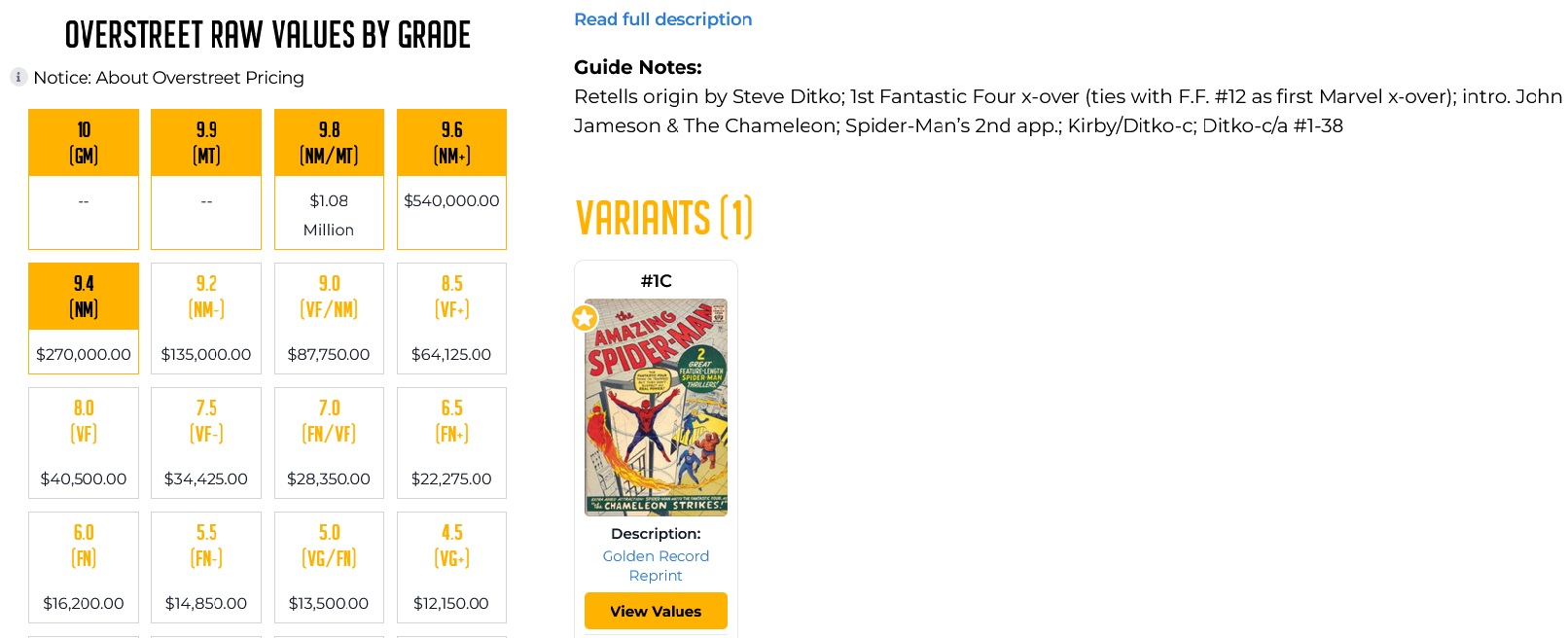
Overstreet Access now tracks prices for comic books graded 9.4, 9.6, and 9.8. This marks a huge change since the site was introduced with pricing that went up to 9.2/Near Mint. Now a subscription to OA is the only place to see Overstreet prices at 9.4 and higher.
By the way, we’re not ignoring 9.9 and 10.0. At this point, there’s still not a significant amount of data out there for most comics in those grades, but rest assured, we’ll get there.
Regular Price Updates
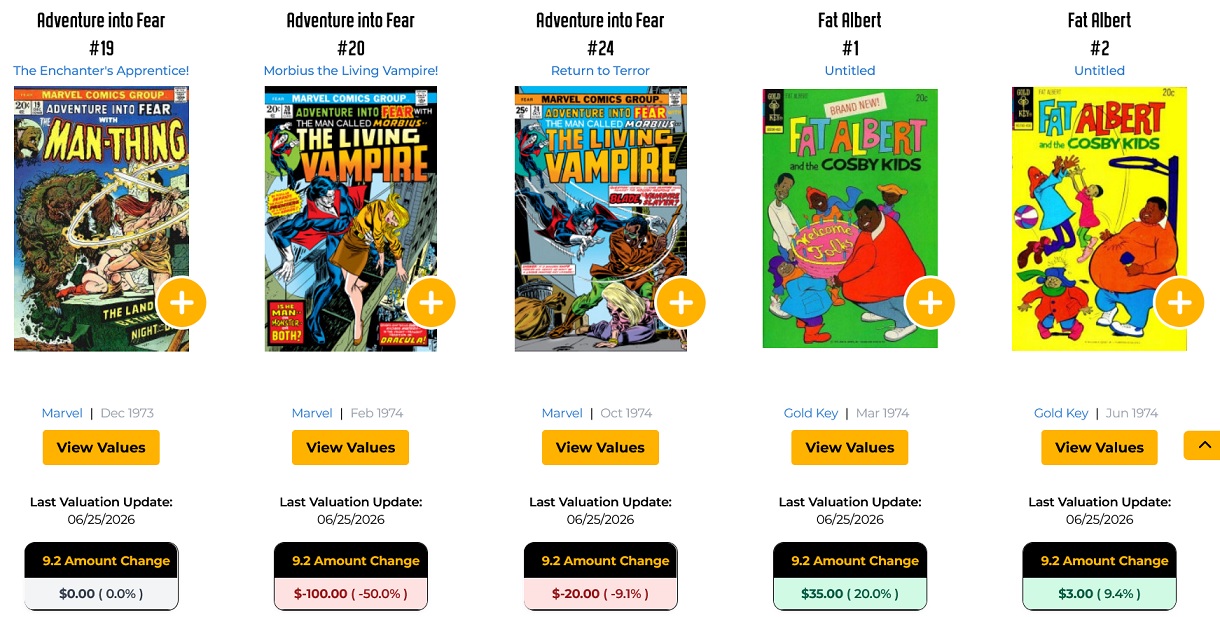
Another crucial change to Overstreet Access is seen in the form of constant price updates. Buying and selling comics is a non-stop machine across many platforms, and we are working tirelessly to provide the most accurate, up to date prices. In the last 90 days, for instance, we’ve updated the values for more than 14,750 issues from the Golden Age to recent issues.
We track both the rises and falls in value.
To view changes, click on the “Search Titles” tab on the home page’s Quick Nav bar, then click on the Recent Value Changes button. From there you can search for specific titles, search alphabetically, by biggest gains or drops, biggest percentage gains or drops, and by oldest or newest changes.
New Dashboard Provides a Quicker Starting Point
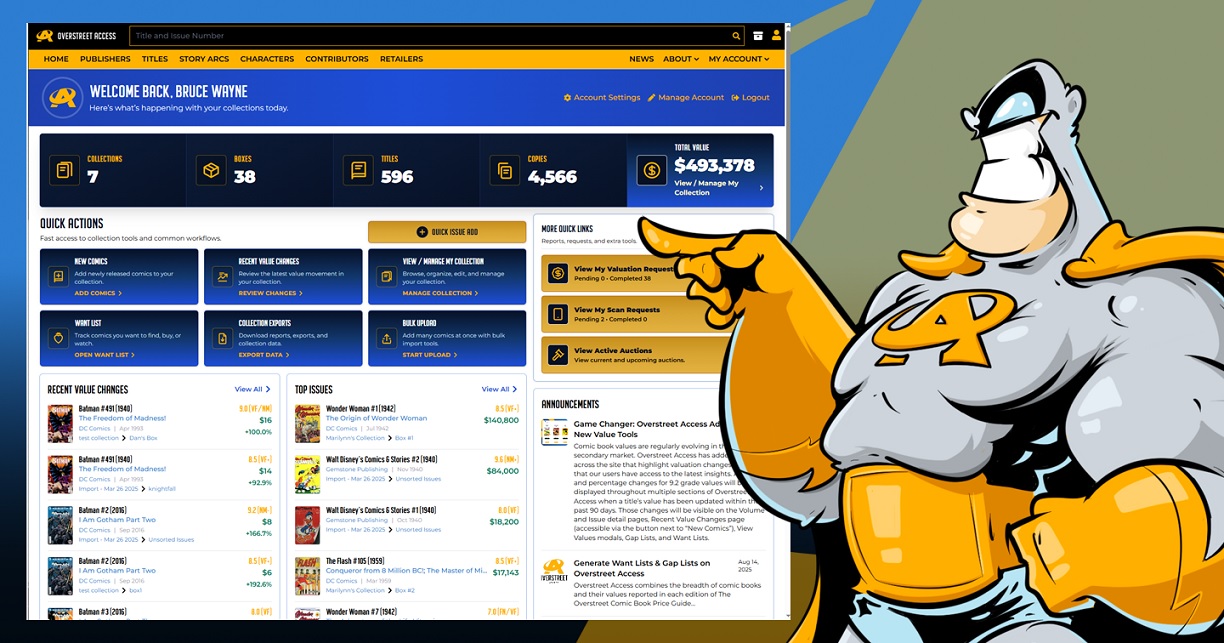
Updates include the new dashboard that was designed to provide a clearer look at a collection and faster access to the tools. Users can see a snapshot of their entire collection or go directly into a specific collection area, see value movement, review top issues, and see Overstreet Access announcements.
- See collections, boxes, titles or volumes, copies, and total collection value
- Use Quick Actions section features tabs for New Comics, Recent Value Changes, View/Manage My Collection, Want List, Collection Exports, Bulk Upload, and Quick Issue Add
- Use the dashboard more comfortably on phone, tablet, and desktop
Add Books to Your Collection Faster with Quick Issue Add
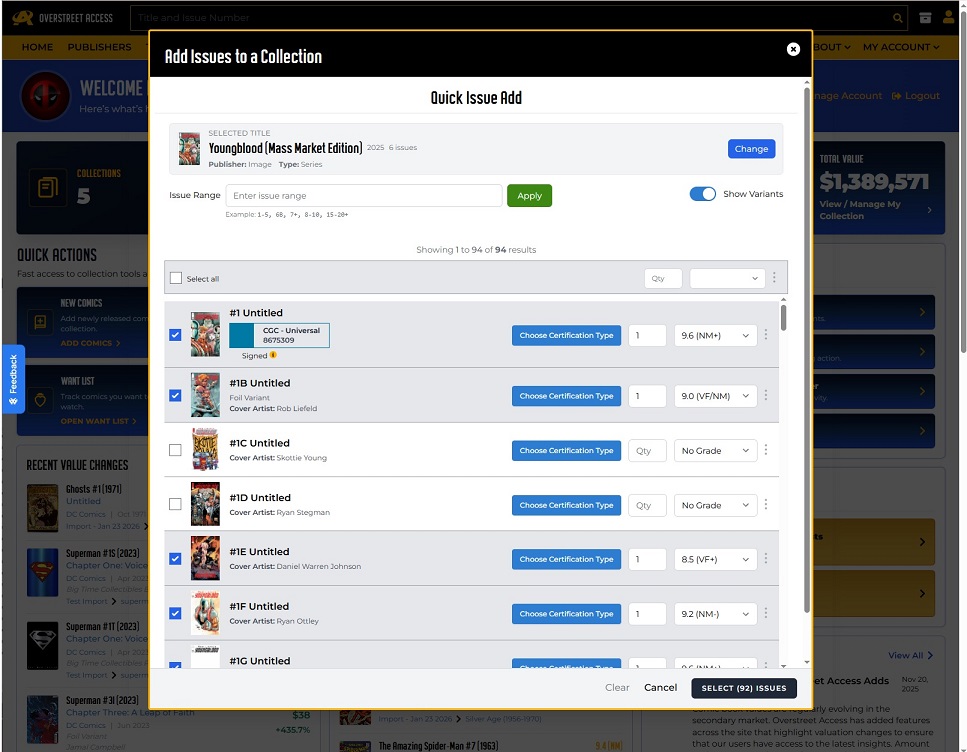
The “Quick Issue Add” button on the dashboard opens a menu where users can search for a specific issue or several within a title. One of the big improvements is in the issue range search bar in which collectors can find a group of issues (for instance 1-10) to narrow their search and avoid scrolling through a long list of issues.
- Select one issue, several issues, or a filtered issue range
- Use the + in a range (for example 7+) to pull up that issue’s variants
- Set grade, quantity, signed, and certified details
- Use Add Issues and Search Another Volume to catalog several titles at once
Beta Collection Manager Streamlines Large Collections
The new beta collection management was designed to improve the working experience for large collections. Instead of jumping from one section to another, users choose a volume from a searchable list and see the issues they own and ones that have multiple copies. This tool is particularly useful for collections that contain many boxes, variants, grades, certified copies, and duplicate copies.
- Open it by going to My Collections and clicking on View New Beta UI
- Use the Volume List, publisher filter, and Search Titles field to find a series
- Switch between Default View, Cover View, and Live View
- Filter through raw, certified, signed, or variant copies
- Edit individual copies or use bulk tools to move, edit, or delete several copies at once
- Open the Gap List in a volume to find missing issues
Make Changes Across Multiple Books with Bulk Tools
The new bulk tools were designed for collectors that are managing a lot of books and want to avoid repetitive clicking. Users can select multiple copies then use bulk actions to move them, edit shared details, or delete copies. This is a powerful tool, and collectors are cautioned to review selected copies before making changes.
- Use Select All, Select Remaining, Unselect All, and Clear Selections to choose books
- Move groups of books between collections or boxes
- Use Bulk Edit Copies to apply shared changes
- Use Bulk Delete to remove books
Issue Pages Are Now More Efficient Research Hubs
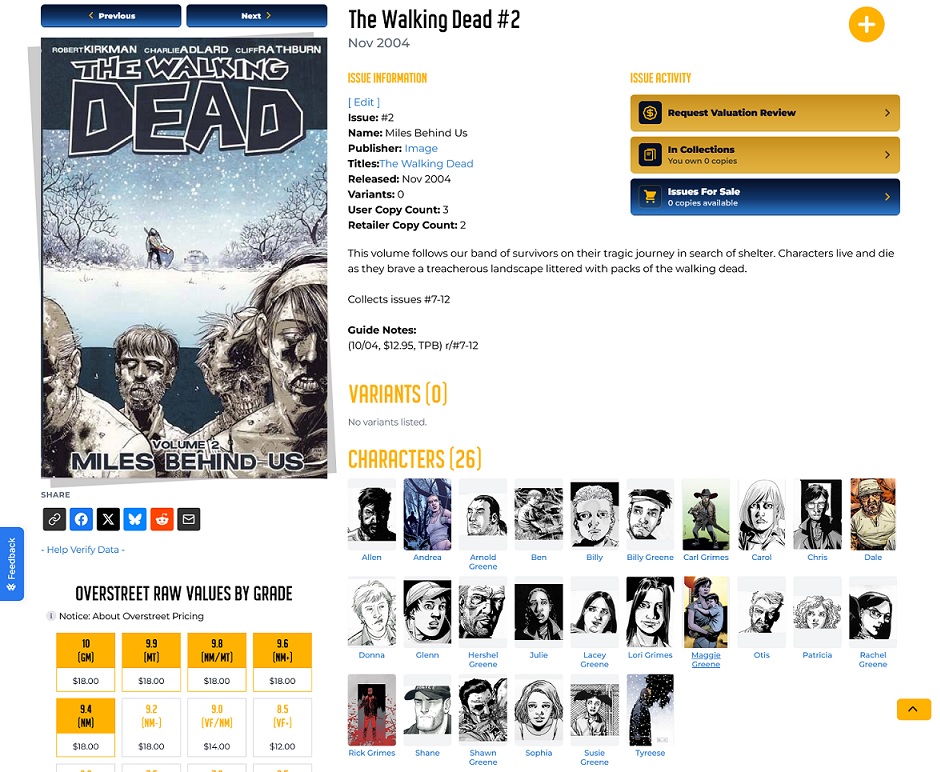
The issue pages now contain more key details and interesting notes to provide a connected reference page. This includes:
- Characters, contributors, variants, story arcs, publisher, and volume context are easy to find and more clearly noted
- Related issues and original issue connections are easier to follow (when available)
- Collectors can learn the significance of issues (first appearances, etc.) with fewer clicks
Cleaner Catalog Links & Better Navigation
Overstreet Access has improved the way catalog records connect to each other with links that are more descriptive and easier to recognize. This is helpful in bookmarking pages, sharing links, or moving between issues, volumes, publishers, characters, contributors, and story arcs. Links in Overstreet Access emails will more clearly point back to issue pages.
Finely Tuned Character Counts & Catalog Quality
Characters and contributor sections are more accurate, reflecting searchable content on the website. They are aligned more closely with active, viewable content, reflecting meaningful live catalog data.
Try the New Tools Today!
Sign in to your dashboard to view these changes and familiarize yourself with the improvements. The Overstreet Access team will continue to improve these and other tools to produce the best, most comprehensive experiences for collectors.

Popular Topics
Overstreet Access Quick Links
Overstreet Access: 9.4 & Higher Prices, Regular Price Updates, More New Features
We’ve made several substantial changes to Overstreet Access (OA) in our ongoing effort to improve the site for our users and make it the most valuable tool in your comic book collecting toolbox.
For more than five decades, The Overstreet Comic Book Price Guide has been the rock-solid, dependable source for prices. Our goal is to make OA even more indispensable to you.
If you’re not already on OA, here’s what you’re missing:
9.4 & Higher Values
Overstreet Access now tracks prices for comic books graded 9.4, 9.6, and 9.8. This marks a huge change since the site was introduced with pricing that went up to 9.2/Near Mint. Now a subscription to OA is the only place to see Overstreet prices at 9.4 and higher.
By the way, we’re not ignoring 9.9 and 10.0. At this point, there’s still not a significant amount of data out there for most comics in those grades, but rest assured, we’ll get there.
Regular Price Updates
Another crucial change to Overstreet Access is seen in the form of constant price updates. Buying and selling comics is a non-stop machine across many platforms, and we are working tirelessly to provide the most accurate, up to date prices. In the last 90 days, for instance, we’ve updated the values for more than 14,750 issues from the Golden Age to recent issues.
We track both the rises and falls in value.
To view changes, click on the “Search Titles” tab on the home page’s Quick Nav bar, then click on the Recent Value Changes button. From there you can search for specific titles, search alphabetically, by biggest gains or drops, biggest percentage gains or drops, and by oldest or newest changes.
New Dashboard Provides a Quicker Starting Point
Updates include the new dashboard that was designed to provide a clearer look at a collection and faster access to the tools. Users can see a snapshot of their entire collection or go directly into a specific collection area, see value movement, review top issues, and see Overstreet Access announcements.
- See collections, boxes, titles or volumes, copies, and total collection value
- Use Quick Actions section features tabs for New Comics, Recent Value Changes, View/Manage My Collection, Want List, Collection Exports, Bulk Upload, and Quick Issue Add
- Use the dashboard more comfortably on phone, tablet, and desktop
Add Books to Your Collection Faster with Quick Issue Add
The “Quick Issue Add” button on the dashboard opens a menu where users can search for a specific issue or several within a title. One of the big improvements is in the issue range search bar in which collectors can find a group of issues (for instance 1-10) to narrow their search and avoid scrolling through a long list of issues.
- Select one issue, several issues, or a filtered issue range
- Use the + in a range (for example 7+) to pull up that issue’s variants
- Set grade, quantity, signed, and certified details
- Use Add Issues and Search Another Volume to catalog several titles at once
Beta Collection Manager Streamlines Large Collections
The new beta collection management was designed to improve the working experience for large collections. Instead of jumping from one section to another, users choose a volume from a searchable list and see the issues they own and ones that have multiple copies. This tool is particularly useful for collections that contain many boxes, variants, grades, certified copies, and duplicate copies.
- Open it by going to My Collections and clicking on View New Beta UI
- Use the Volume List, publisher filter, and Search Titles field to find a series
- Switch between Default View, Cover View, and Live View
- Filter through raw, certified, signed, or variant copies
- Edit individual copies or use bulk tools to move, edit, or delete several copies at once
- Open the Gap List in a volume to find missing issues
Make Changes Across Multiple Books with Bulk Tools
The new bulk tools were designed for collectors that are managing a lot of books and want to avoid repetitive clicking. Users can select multiple copies then use bulk actions to move them, edit shared details, or delete copies. This is a powerful tool, and collectors are cautioned to review selected copies before making changes.
- Use Select All, Select Remaining, Unselect All, and Clear Selections to choose books
- Move groups of books between collections or boxes
- Use Bulk Edit Copies to apply shared changes
- Use Bulk Delete to remove books
Issue Pages Are Now More Efficient Research Hubs
The issue pages now contain more key details and interesting notes to provide a connected reference page. This includes:
- Characters, contributors, variants, story arcs, publisher, and volume context are easy to find and more clearly noted
- Related issues and original issue connections are easier to follow (when available)
- Collectors can learn the significance of issues (first appearances, etc.) with fewer clicks
Cleaner Catalog Links & Better Navigation
Overstreet Access has improved the way catalog records connect to each other with links that are more descriptive and easier to recognize. This is helpful in bookmarking pages, sharing links, or moving between issues, volumes, publishers, characters, contributors, and story arcs. Links in Overstreet Access emails will more clearly point back to issue pages.
Finely Tuned Character Counts & Catalog Quality
Characters and contributor sections are more accurate, reflecting searchable content on the website. They are aligned more closely with active, viewable content, reflecting meaningful live catalog data.
Try the New Tools Today!
Sign in to your dashboard to view these changes and familiarize yourself with the improvements. The Overstreet Access team will continue to improve these and other tools to produce the best, most comprehensive experiences for collectors.
Popular Topics
Overstreet Access Quick Links